12 Spatial Interpolation
Understand what spatial interpolation is
Learn about two spatial interpolation methods – IDW and spline
12.1 Spatial Interpolation
Often, we want to know how a variable, such as air temperature or soil pollutant concentration, varies over space. Within the study area, we may take measurements at different locations. But it is often not possible or too costly to measure the actual value at all locations throughout the study area. Instead, we typically take measurements at locations strategically sampled throughout the study area to capture how the phenomenon varies over space. Then, based on values measured at these sampled locations, we may also want to estimate values where no measurements were taken. This is when spatial interpolation comes useful.
Spatial interpolation is the process of using known values measured at sampled locations to estimate values at unsampled locations. In its strict sense, the term interpolation means that by estimating values, it only fills gaps in between know locations. Predictions made beyond the region covered by known locations are less reliable.
Spatial interpolation uses known values nearby to make predictions. This approach is based on the fundamental assumption of spatial autocorrelation — things that are close together tend to have similar characteristics. As Waldo Tobler noted, “Everything is related to everything else, but near things are more related to each other.”, known as Tobler’s First Law of Geography (Tobler 1970). This makes sense intuitively. For instance, when we check a weather report, we are using the temperature measured at a nearby weather station to approximate the temperature at our location.
In GIS, a tool for spatial interpolation will generate an output raster representing the continuous variation of the variable over space. At each cell in the raster, nearby known values — either data points within a defined neighborhood or a fixed number of closest data points — are used to calculate the estimated value at that cell. A user can define how to select nearby data points for estimating the value at every cell location.
Various methods are available for spatial interpolation. We will introduce two common methods here – Inverse Distance Weighted (IDW) and Spline interpolation.
12.2 Inverse Distance Weighted (IDW)
Inverse Distance Weighted interpolation, often referred to as IDW, is a simple and commonly used spatial interpolation method. The name Inverse Distance Weighted reveals how the method works. It weighs nearby known values by the inverse of the distances (or a power of distance) to make a prediction at an unknown location.
IDW interpolation generates an output raster with cells presenting locations. The value at each cell is predicted by calculating the weighted mean of known values nearby. The weight of a known value is the inverse of a power of distance from this location to the cell location. The closer a known point is to the center of the cell being estimated, the more influence, or weight, it has in the averaging process Figure 12.1.
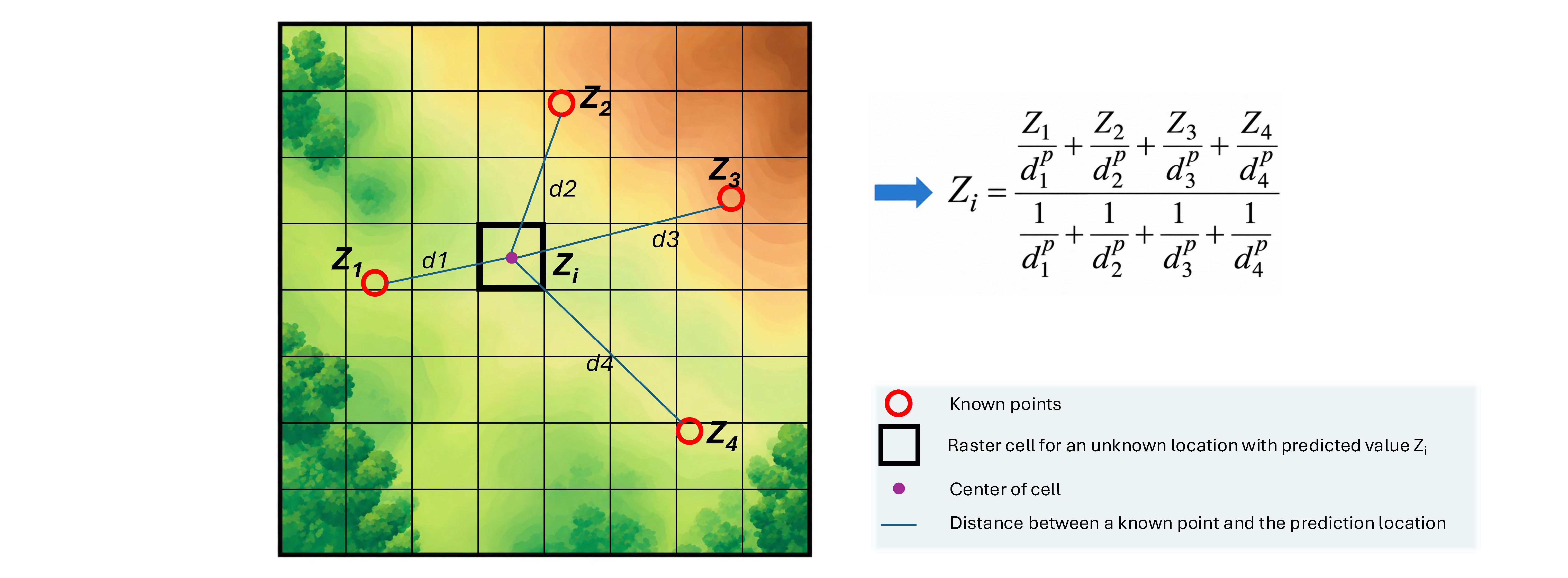
Mathematically, the IDW process can be expressed as follows: To estimate the value Zi at an unknown location i:
$$
Z_i = \frac{\sum_{j}^{n} w_{ij} \cdot z_j}{\sum_{j}^{n} w_{ij}}
$$
where Zi is the estimated value for the unknown point at location i, wij is the weight for a known point j in predicting the value at location i, Zj is the known value at sampled location j, and n is the number of known values used for estimating Zi.
The weight of a known value at a sampled location j for the estimation at location i:
$$
w_{ij} = \frac{1}{(distance_{ij})^p}
$$
where \(distance_{ij}\)is the distance between the sampled location j and the unknown location i. p is a user-defined power parameter.
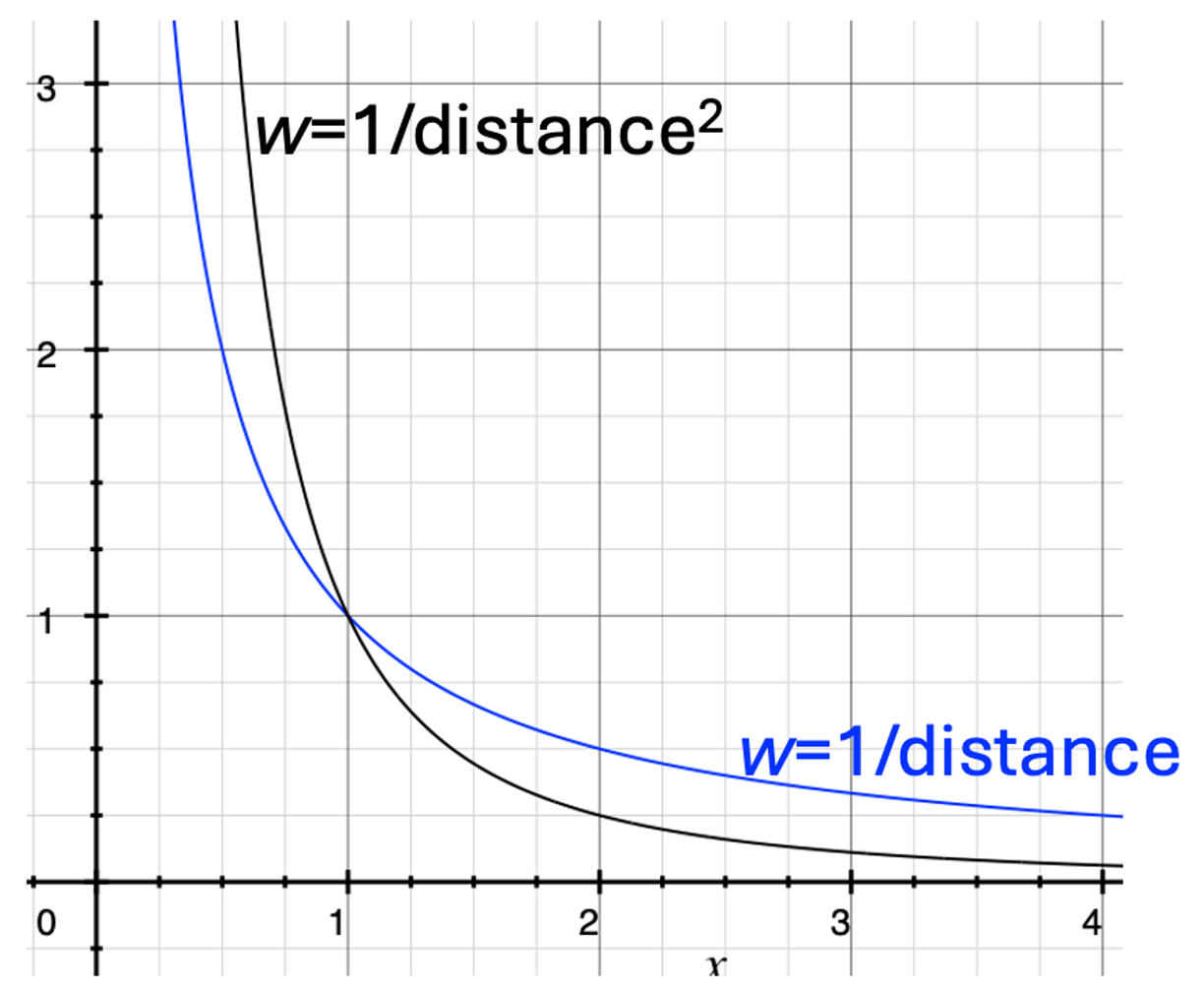
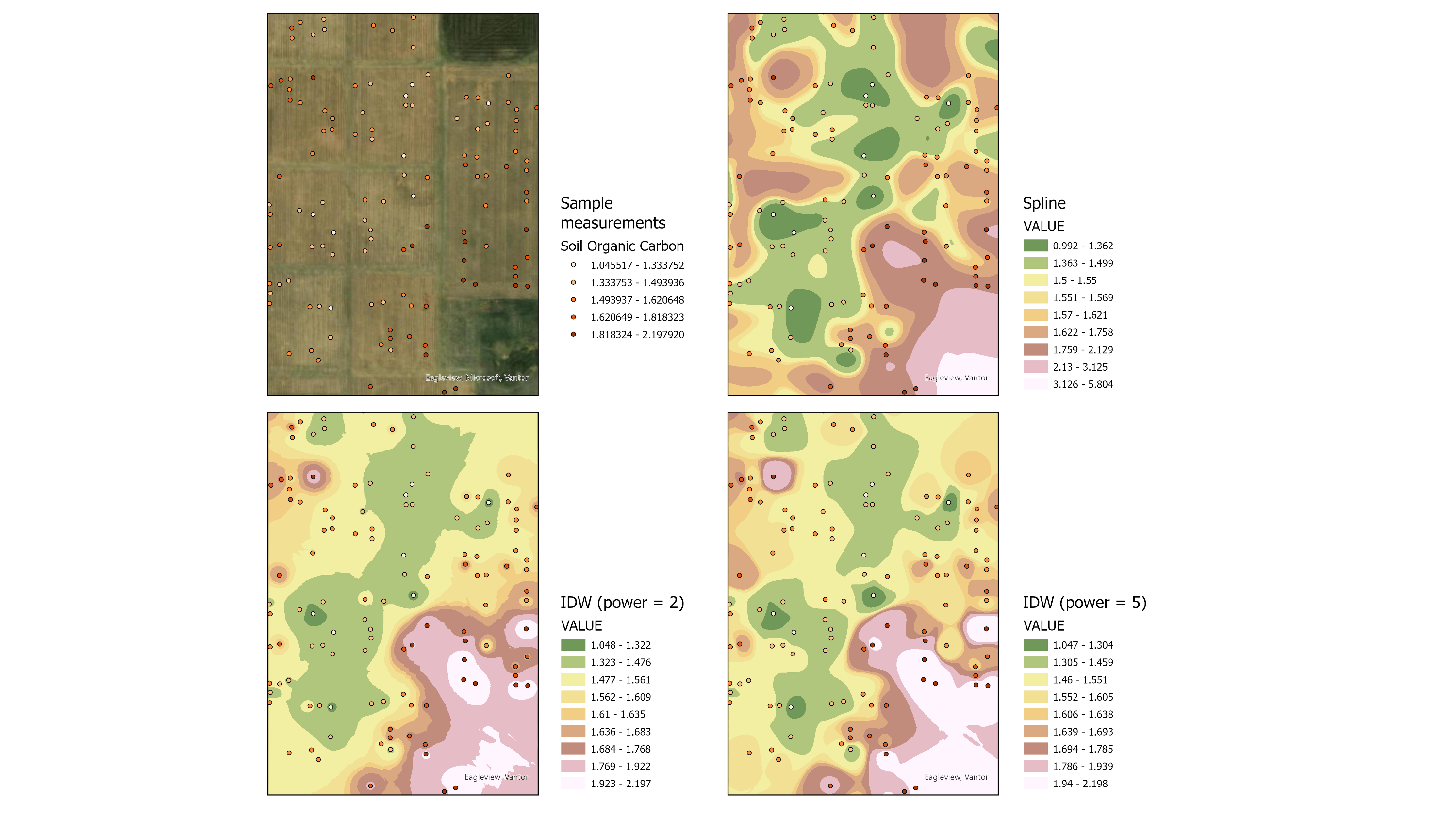
When p = 1, the output raster surface is smooth and shows gradual changes. When p = 2, a stronger emphasis is placed on nearby known values instead of those farther away. With increasingly higher values for p, we see stronger local influence of input data points and sharper changes in the output surface (Figure 12.2). A common value for p is 2, which works well in many real-world phenomena.
A user can specify the criteria for determining which input data points are considered nearby and thus included in the prediction at each location. There are two ways to find nearby known data points. One way is to find all known data points that falls within a circular neighborhood with a defined radius from the prediction location. Another is to find a fixed number of data points closest to the prediction location.
IDW is a widely used spatial interpolation method due to its simplicity and the ability to weigh known data points by distance to generate a smooth surface that presents how the variable of interest changes over the entire region. However, IDW method also has some limitations. First, how known values are weighted is arbitrarily determined. Second, values at known locations in the output prediction raster can deviate from the actual known values used as input, since nearby data points influence the raster cell value for that known location.
12.3 Spline
Spline interpolation method estimates values by fitting a mathematical function that minimizes overall surface curvature, resulting in a smooth surface that passes exactly through all known sample points. As a result, the cell values at the sampled locations in the output raster are identical to the original measured values (Figure 12.3).
Imagine bending and stretching a rubber sheet so that it passes through all the known points, which adds a z dimension representing the variable over a flat surface defined by x and y coordinates. This is how spline interpolation generates a continuous surface from discrete observations. Different spline interpolation variants (e.g., regularized vs. tension) control how tightly the surface conforms to the input data points versus how smooth it appears.
Spline interpolation is useful in that it preserves the exact original input values all the known locations. However, since the surface passes exactly through input points, spline interpolation can be sensitive to noise or outliers in the input data. Additionally, the interpolated values may go beyond the range of input values.
12.4 Note on output raster resolution
When using a spatial interpolation tool, we can adjust the cell size, or spatial resolution, of the output raster. A smaller cell size (higher spatial resolution) produces a smoother-look surface, while a larger cell size produces a more pixelated appearance. Note that changing the cell size does not alter the underlying spatial pattern or change the accuracy of the interpolation. It only affects how detailed the interpolated surface is represented.
12.5 References
Tobler, W. R. (1970). A computer movie simulating urban growth in the Detroit region. Economic Geography, 46(Supplement), 234–240.
Potash, Eric (2023). Data for Multi-site evaluation of stratified and balanced sampling of soil organic carbon stocks in agricultural fields. figshare. Dataset. https://doi.org/10.6084/m9.figshare.23669304.v2